

I have set the log parameters as attached below.

But several parameters are dropped in named incorrectly in the first log after changing the settings:
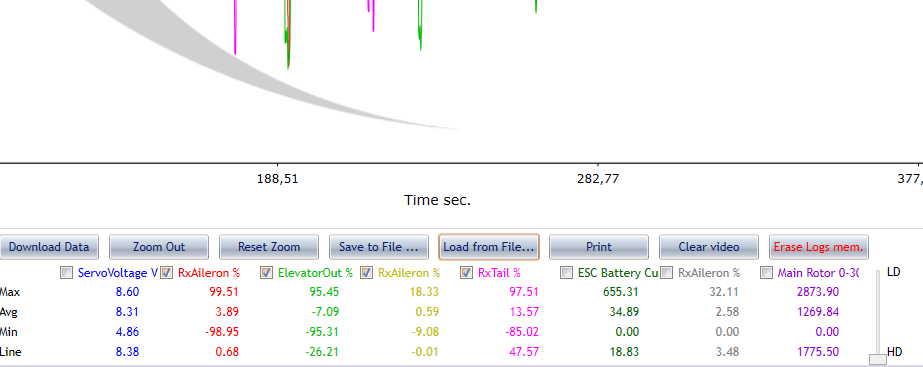
In later logs the correct parameters are shown.

Together with earlier noticed not storing the changed parameter settings when logs are first viewed, getting the correct logs is a very much try, guess and try again procedure.
Streamlining this so that what you set is what you get first time would be helpfull.

Are you one hundred percent sure that the log with the parameters different from the ones you set is not a previous log?
Do you know that if you connect to the flight controller before powering it up or while it is powered up, the logs are stopped and deleted?
In order for a log to remain in the logs memory, you have to power the flight controller and turn it off without ever having connected to the flight controller otherwise the current logs are stopped and deleted.
If you want to see if the flight controller has stored the new parameters to log that you set in the "Parameters Setting" tab, you can go to the Real Time tab and see if the parameters displayed at the bottom match the ones you set.
Before you make a recording you must close the software, disconnect from the flight controller de-energize it and re-energize it.
If the red led "trills" quickly, it means that the flight controller has stopped and deleted any recordings in progress and is not recording because you have connected to the flight controller.
If the red led is off and lights up once or twice or three times indicating the Setup (1, 2, 3) active, the flight controller is NOT recording.
Only if the red led is always on and going off once or twice or three times indicating the Setup (1, 2, 3) active then it is recording.
I'm 100 procent sure I did not set it up where I a want to view 3x Rx Aileron % on 3 different loging channels.
I have attached the recorded log and there you can also see that 3 channels are named RX Aileron % but they all contain different data. I cannot see how a user would be able to control this strange behiavor. This clearly indicates something goes wrong within the software.
I'm writting these suggestions in the hope that you can improve your software, so that me and your other customers can get a beter user experience and appreciate using your products.
How a company representative communicates with their customers is also contributes in this user experiences, for now I'm bit in doubt if this is a plus or minus at the moment.
Best regards,
Rick van der Sloot
A possible cause could be that you have updated the firmware and have not carefully read the message that appears at the end of the update:
