

While attempting to set up the Helicopter on the Bench, I am getting random
cut-outs of the Motor, and random, but extreme jittering of all the Servos.
The Helicopter is as follows:
SAB Kraken S 700
Graupner MZ-32 Tx and GR-16 Rx
KDE 700XF 535 Motor
Hobbywing 200A Opto V4.1 brand new, I literally just opened it. I bought it 10 years ago for another project.
Graupner HCM860 BB MG x3 - Cyclic
Graupner HCM880 BB MG x1 - Tail
Rx Battery is Turnigy 2S 2600 MAH direct to Ikon2 HD
Flight Batteries are 2x Turnigy 6S 5500 MAH
The Ikon2 HD is mounted on the elevated FBL Platform (using the 4 provided Rubber Soft Mounts), and the SAB Manual recommended 2mm of Mounting Tape. I used the two Squares of the MSH provided Tape.
ESC Telemetry is showing in Transmitter, via Rx Telemetry output.
Hobbywing SCM Module used between ESC and Ikon2. "P" Side Voltage and Ground on the output of the SCM is supplied by the GOV Port + and - Pins. The Output "P" Wire from the SCM is in Pin 5 of the 4-5-6 Port. Output from Data Port of ESC to SCM provides ESC Voltage and "P" Signal to ESC Input side of SCM.
The GOV Wire, (Orange) from the HW ESC Throttle Wire (4 wire bundle) is in Ikon2 GOV Port, other three Wires (Connector) are in CH-1 for Throttle Control.
The Motor is responding to Governor Settings, which were set at 1800, 1900, and 2000. Motor Temp on the Bench is 138 Deg. ESC Temp is 86 Deg.
ESC is in Airplane Mode, Voltage Cutoff and Active Freewheel are Disabled. Startup Power is set to 1. Other settings are either defaults or adjusted as necessary for this setup.
I'm beginning to think either the KDE Motor is giving off too many Vibrations, and that there is also possibly an issue with the Hobbywing V4.1 ESC, despite it being on their latest Firmware. I have read about these issues in Helifreak, regarding the 200A Ver 4.0 ESC, but I believe the issues were not fixed in the Ver 4.1 ESC either. Can you confirm either way please, before I spend money for a new Motor and ESC? Something in this setup is giving me fits, and I'm not sure if it's a single point of failure, or multiple issues. Please let me know if you need any other Logs or something specifically done to diagnose this. Thank you very much, in advance.
**EDIT** I just re-ran the Test with the Real-Time Analysis, and this is the XML File for that. None of the Sticks were touched. The only thing I changed during this Test was the Governor Speed, with the IU Switch. The Motor Temp never surpassed 153 Deg F, and the ESC never went over 98 Deg F.
Harry Strain.

Hi
You mention that you’re performing the initial bench setup on a new model.
However, we see that your flight controller was activated on Sunday, July 31, 2022, at 7:12:56 AM and has already logged 58 flights totaling 5 hours, 2 minutes, and 52 seconds.
We therefore assume that the flight controller has been operating without issues for the past four years.
From the log “Recorded Log number 92 - BRAIN2 3.4.276” and the configuration file you sent us, everything appears to be in order, including the motor RPMs, which are stable.
So, based on the same log, the ESC and motor do not seem to have any problems.
However, in the log “Throttle_Cuts_and_Servo_Jittering_RealTime,” we see from the “RxFrameRate” curve that radio signal reception appears to have major issues, and during periods of signal degradation and frame loss, there is interference on the RxPitch, RxThrottle, and Active Setup selection signals.
When the “RxFrameRate” curve is stable and clean, there is no interference on the RxPitch, RxThrottle, and Active Setup selection signals.
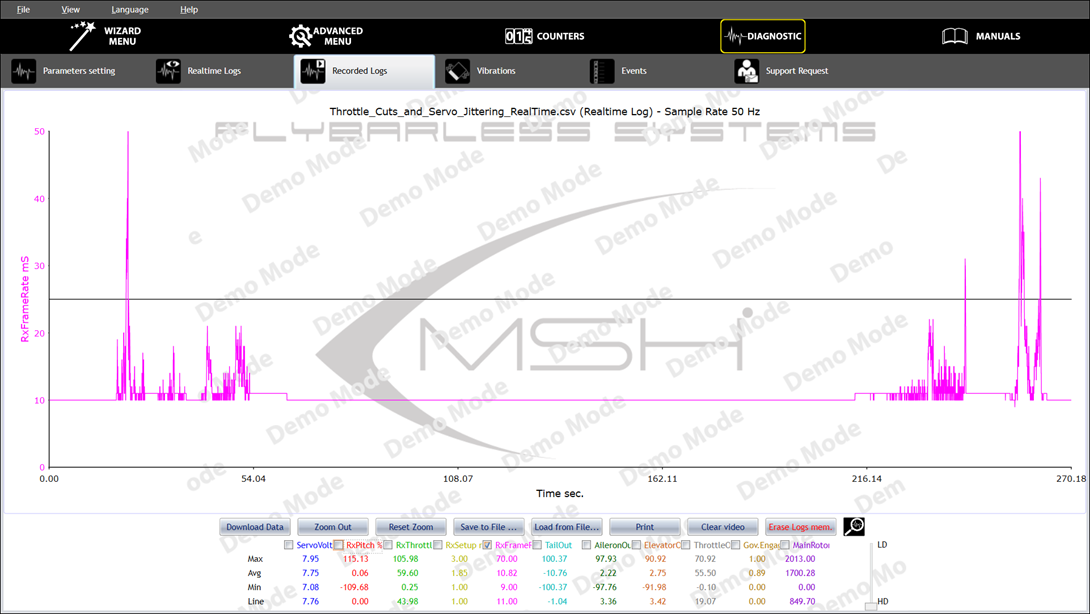
There therefore appears to be an issue with the radio connection between the transmitter and receiver and/or between the receiver and the flight controller.
Have you used this same transmitter and receiver before, or are they new?
Have you tried rebinding the transmitter and receiver?
Is the transmitter’s firmware updated to the latest version released by the transmitter manufacturer?
Is the receiver’s firmware updated to the latest version released by the receiver manufacturer?
Have you checked the connector connections running from the receiver to the flight controller?
Have you checked the connections of the connectors going from the receiver to the flight controller?
Are you sure you disconnected the positive (3.3V) connection from the wire going to the SAT1 connector on the flight controller so that it doesn’t short-circuit with the positive of the other connection (8V from the 2S LiPo) through the receiver?
Could it be that you’re holding the transmitter’s antenna too close to the receiver’s two antennas, causing radio signal saturation that the receiver’s automatic gain control (AGC) can’t manage and reduce?
Could it be that the receiver’s antennas are running too close to the power cables (Lipo battery => ESC => Motor), causing crosstalk issues?
Have you checked with a multimeter that the electrical resistance between the metal parts of the tail assembly and the motor and/or the model’s frame is zero, so that electrostatic charges cannot build up during the movement of the drive belt?
Thank you BrainDev for your analysis.
This Ikon2 HD is new to me, and I haven't flown it yet. The other Flights are from the previous Owner.
While working with the Logs today (for the first time since I've owned any of the 9 Brain2 Units I have), I think I figured out how to clear them from the Unit, before extracting the Jitter Test Log I posted. The Log #92 was the highest number in there at the time, and it was my assumption that that was most likely the most recent one. I have no doubt that the Ikon is fine. This is why I continue to buy and use the Brain2/Ikon2 Controllers. You Gents make an awesome product!
You are correct, I had the Graupner MZ-32 Tx on the Bench, near the Helicopter Fuselage while testing. The Antenna of the Tx was probably about 1.5 to 2 feet from the Rx Antennas. In the future, I will increase this distance, to mitigate any RF saturation issues. I have never had issues with this before, but there's always a first time.
The Transmitter, Receiver, Ikon2, and Hobbywing ESC are all updated to the most current revisions of their Software. I have owned all of my Graupner Equipment since 2018, when i switched from Futaba on 72 MHz. After an extensive break from the hobby, I am going back through all of my Models and updating, then reviewing setups and completing any mechanical checks and maintenance.
This particular model is new to me. the Motor is older, previously bought used, but I have never flown it. I had problems with it running very hot in another Model I was setting up (10 years ago), with a Graupner ESC, so I switched it for a Scorpion, and left it for another project. those same problems seem to be resurfacing using the Hobbywing V4.1 ESC, along with other previously well documented issues, specific to the Hobbywing V4.1.
The Tx and Rx have both been used, and function well. They were bound initially for this Model, then un-bound and re-bound IAW the Brain Setup Wizard Steps.
Connections to from the Rx to the Ikon2 are good, new Wires and Connectors, and I did snip the Red Wire on the SAT1 extension from the GR-16 CH-8 port to the SAT1 JST Cable. There is no Rx Voltage present at the SAT1 Port.
The Receiver is mounted on the extension Plate provided by SAB, with the Antennas in the forward direction. The Antennas exit the centerline of the Boom on either side, forward of the boom, aft of the Canopy, between the "split" present on the Kraken 700. The Rx does sit over the top of both sides of the Tail Belt though, which is an interesting point you raised. i will use a Multimeter, connected to both the Tail Rotor Case, and the Motor Mount Assembly, and check both resistance and voltage, with the Motor on, and off. I have read about the Tail Belt generating static charges, similar to a Van De Graf Machine, but haven't placed much stock in it, due to the amount of counter-posts claiming that there were no issues with it. Personally, I've never experienced this, but anything is possible. If it appears, I will attempt to use some kind of Silicone Belt Dressing to mitigate it, and perhaps a ground wire of sorts.
"However, in the log “Throttle_Cuts_and_Servo_Jittering_RealTime,” we see from the “RxFrameRate” curve that radio signal reception appears to have major issues, and during periods of signal degradation and frame loss, there is interference on the RxPitch, RxThrottle, and Active Setup selection signals.
When the “RxFrameRate” curve is stable and clean, there is no interference on the RxPitch, RxThrottle, and Active Setup selection signals."
I'm guessing that this interference might perhaps trigger some kind of failsafe that would temporarily shut down the Motor, or send the ESC a shutdown signal, then when it clears up, the Motor would automatically re-start? If this is the case, then the entire problem im experiencing is due to interference, quite possibly from the Signal Saturation you spoke of? The Servos Jittering, and moving themselves (pitch, cyclic, tail) would also be a symptom of this interference?
i will address each of these Points and post back with the results and resolution. Again, I thank you for your time and analysis. You're the best!
Harry Strain
Regarding the issue of a possible fail-safe and the resulting shutdown of the ESC (and a slow restart of the ESC if you’ve programmed it in “External Governor” mode, or a fast restart if you have programmed the ESC in Airplane mode and enabled Autorotation Bailout), you could check the Events (the file of which you did not send) to see if there are any events indicating that a Fail Safe occurred and the corresponding Throttle Fail Safe during the Real-Time recording.
Have you tried moving, pulling, and pushing each of the cables connected to the flight controller, as well as the cables connected to the receiver?
(small movements of the flight controller generate small movements detected by the gyroscopes, which can cause slight movements of the servos—and this is normal)
Good morning (evening) BrainDev,
I apologize for this taking so long, but I had a lot of Homework to do from your last two Replies. I'll list the steps taken below, and upload files as I go.
First, I began Continuity Checks as requested. Everything in front of the Tail Boom, with the exception of the ESC Case and the Main Shaft had continuity. The Tail Rotor Assembly had continuity within itself, however, as with the Main Rotor Shaft, the Tail Rotor Shaft had no continuity with through it's bearings to the rest of the assembly, or for some reason, to the Main Chassis/Body. This is the baseline RT and Events. Dismal.
Next, I completely disconnected the Tail Belt, and ran a short test. The results were very similar, pretty much ruling out significant Tribo-Electric charging from the Tail Belt messing with the Rx, at least as the main driver of this interference.
Now, I turned off the Governor on all Setup Phases (IU1, 2, and 3), and set a straight curve on Normal. Checking ALL wiring, everything was in order, however I did find a broken Rubber Lord Mount under the FBL Plate (Soft Mount), and I replaced that. I also changed the Ground from the Governor Port, adding a Ground Wire and Positive Wire to the SCM on the Output side, from the Governor Port, to the "P" side of the SCM Output. A short test was completed.
Results were still the same. Now, I completely unplugged the Telemetry Wiring from the ESC Data Port to the SCM, and from the SCM to the 5 Pin of the 4-5-6 Connector, and removed the Ground and Power Pins from the Governor Port Connector that were connected to the SCM Output. Literally only a Throttle Control Connector to the Ikon2. I also temporarily installed a piece of small gauge wire, as used in Breadboard Prototyping (wire-wrapping) from the Tail Rotor Housing, externally to the Main Chassis, and checked continuity. That was good. I did run a test at this point, however it was still dismal, and the same as the previous tests.
Test results were still horrible.
I began studying the Hobbywing Documentation for the V4.1 200A OPTO, and the SCM Module that came with it. I noticed that for some reason, the V4 130A differed from the V4 160A and 200A regarding connections from the ESC to the Brain2 and the ESC Data Port to the SCM Input side, and from the SCM Output side, to the Brain2, which are both wrong on the SCM Output, as they have Users plugging the complete Output Connector into the 4-5-6 Telemetry Connector, complete with Power and Ground. If someone wasn't familiar with the Brain2/Ikon, it would instantly be damaged upon powerup. Documents are below.
So .. With all things not working so far, I figured go for broke, and follow the Wiring Instructions in the SCM Manual for the V4 130 Opto, instead of the Instructions for the 160/200A.
I removed the Yellow RPM wire (part of the 4 wire bundle from the ESC) from the Ikon2 GOV Port, and put it on the Rx "R" Port of the Input side of the SCM. Next, I used a M-M Jumper from the SCM Output side, from the Rx Port to the Ikon2 GOV Port.
The other part of the 4 wire bundle wire (Throttle) remained the same, with the White-Red-Black from the ESC (between the Motor Wires) going directly to Ikon CH1 for Throttle.
The HW supplied Telemetry Y Cable from the ESC Data Port has the Fan on the short Leg, and the other Leg now has it's long wire running to the SCM Input side, to the "P" Pins. The Output side of the SCM has the "P" Pin going to Pin5, and the "R" Pins (W-R-B) are now plugged into the Ikon2 Governor Port.
With the exception of the Throttle WH-R-BL, now all of the Wiring from the ESC and Data Port is isolated by the SCM. I ran a test with this configuration, in Linear Throttle, no Governor. SIGNIFICANT improvement. Not 100%, but much better. It was the Governor Wire introducing the hysteresis into the Brain2/Rx, and messing with things. Files below.
The Events and RealTime Logs still show some random Bank (setup) switching, and there was a very tiny bit of servo jitter, but for the most part, this is a huge improvement. I still have a huge amount of vibration at intermediate Throttle, and I'm going to have to chase that down, and also find out what is causing the small amount of jitter and random Bank switching. There was also a Rx Signal Off, and Throttle gone in Fail Safe Event at the last part of the Events Log, But I believe that is where I unplugged the Flight Battery, shut off the 2S Rx Battery Switch.
I have not included the Config File, as it basically has not changed from the original. I do apologize for the Book here, but I wanted to cover all the steps completed, and show results for each task. I'm still not 100% confident in the HW ESC and the KDE Motor, and I'm extremely hesitant to fly this combination, even if I do get it 100% worked out at this point. Way too many issues. I do hope this experience will help someone in the future though, especially with the SCM and a NOS or used HW 200A Opto.
As always, thank you in advance for any information or suggestions.
Harry.
Interesting tests.
In this specific case, the only parameter that needs to be checked among those included in the default setup of parameters to be logged is “RxFrameRate” (use the “Reset Logs to Default …” command in the File menu).
Since the problem relates to radio signal reception, the other QOS (Quality Of Signal) parameters might be of interest: RxFades, FrameLosses, Holds, RSSI (if the receiver also sends this value).
Unfortunately, in the first log (0646), the “RxFrameRate” parameter is missing.
Fortunately, in the subsequent logs, the “RxFrameRate” parameter is present and indicates major issues with radio signal reception.
In fact, the situation is even worse than in the first log sent on 4/16.
Unfortunately, the latest log (916) also highlights serious signal loss issues, and with such a graph, flying is absolutely not recommended because losing control of the model could cause serious damage to property, animals, and people (damage to the model, even if costly, is far less significant):

What we can suggest at this point is to try installing another receiver if one is available on another model to verify that it hasn’t fallen and might be damaged in some way.
Among other possible suggestions is to twist the cables, as this reduces high-frequency interference on the signal cables to some extent (it has the same effect, albeit reduced, as when ferrites were used to wrap around the cables to filter out high frequencies).
Another suggestion is to secure the connectors to the flight controller and receiver by applying a strip of hot glue (which can be easily removed by peeling it off) between the plastic of the connectors and the upper edges of the flight controller and receiver casings.
This will help prevent potential false contacts caused by vibrations generated by the motor.
Also check that there are no cold solder joints on the six connectors linking the motor to the ESC by bending the wires entering the male and female connectors, ensuring the male connectors are firmly seated in the female connectors and that there are no loose or loose connections.
Perform the same check on the two male and female connectors linking the battery to the ESC.
Check that the screws securing the motor are not too long and might rub against the motor windings during rotation. If necessary, add washers under the screw heads.
The final suggestion—though highly unlikely and to be used only as a last resort—is to apply bearing grease to all bearings (motor, main shaft, tail shaft) to reduce metal-to-metal friction.