

As noted elsewhere on HeliFreak, I have recently returned to the hobby after a few years of hiatus (since early 2022). I have been having problems with the Event Logs after upgrading the Brain2 BTs to firmware v3.4.201.
The attached files are from the last of my four helis—a Protos 700 v2. This Brain2 BT unit is different from the others in that the micro USB connection is defective, and the unit can only be communicated with via Bluetooth (I haven't bought a Remote USB 2 interface—although if recommended, I would consider it).
Anyway, the reason for this support request is that Since this is the last of my four helis and I have just upgraded it, it is the cleanest in terms of Event Logs and Recorded Logs. There is only one.
As with the other Helis, the blades were removed to allow a bench test. Then the process used was:
1) Power up Heli and connect to Brain2 via Bluetooth using Configurator v3.4.206. The unit was identified as having old firmware.
2) The unit has undergone the upgrade and passed all checks. It is now running firmware v3.4.201. Erase Logs as recommended in the update. Save the Configuration file (attached). Power down, Heli.
3) Power up the Heli, connect the transmitter (but not the configurator) and check that the servos move correctly.
4) Spin up the Heli to allow a rudimentary check for unbladed vibrations. Power down Heli.
5) Power up the Heli, connect the configurator, download the Event Log and save it to the file (attached). Download the "flight" log and save it to the file (attached).
Power down Heli.
This support request is based on the fact that while the Flight log appears to have captured the bench test, I cannot relate what happened on the test to what the log is saying with the event log. The "flight" (#1) lasted just over a minute, and Log N is set to 1 for lines 3 to 25. Log 1 terminates at Events time = 64 (64 seconds—which correlates with the "flight" log). What appears to be missing is the events relating to the startup, similar to:
6;;1;PowerOn
6;;2;Coldstart
6;;3;All of the Self Tests passed successfully
6;;51;Setup 1 loaded
6;1;6;Logs Recording Started
prior to line 3.
Can you please confirm that the Event log and the flight log are for the same flight and whether the Event log contains the events correctly? If not, what should a correct, valid Event log look like for Flight 1? I have also attached the last event log from 2021, which is when I last saved it before I stopped flying the heli.

Hi Paolo,
Thank you for contacting us.
We are glad to hear that your passion for this wonderful hobby is back.
From the configuration file you sent us, we see from panel 1 that you are using a Spektrum Transmitter and from panel 3 we see that you are using a receiver with the two separate output protocols: Smart.Port & S.Bus.
Since we are not aware that Spektrum transmitters handle receivers of this type, to understand better it would be helpful to know what model of Spektrum transmitter you are using and what brand and model of receiver you are using.
Do you perhaps use an external radio module attached to the back of the Spektrum transmitter to transmit with the ACCST or ACCESS protocol?
By the way, if you saved the configuration file for diagnostic purposes and then contact us as explained in the message that appears before saving the file:

we see that the receiver's connection with the transmitter appears to be active (green RX light in Wizard panel 5), but the elevator, aileron, and tail sliders appear to be at zero:

This could be a problem unless you saved the configuration file without holding both transmitter sticks down and to the right while you saved the configuration file as required for diagnostic purposes.
We also see from the color of the slider that for tail gain you are not using transmitter-controlled gain but are using software-controlled gain and are using a very high value (75%). If this value was obtained during some test flights, it means that the mechanical tail gain is too low and therefore more easily affected by small games of the mechanics. We therefore suggest that you move the uniball of the tail servo horn one hole outward so as to increase the mechanical gain and reduce the value of the electronic gain (provided that the value 75% was obtained during test flights).
Also, we see that the Throttle value is less than the 0% value (-2%). This causes a dead zone that causes a delay in spoolup since it appears from panel 12 that you are using the governor of the flight controller. In addition, this may cause the tail to shift abruptly when starting the motor. We suggest that you correct on the transmitter the minimum throttle travel to get in panel 5 of the Wizard the value zero.
In panel 10 we see that you have selected neither the number of blades in your model nor the blade length of your model:
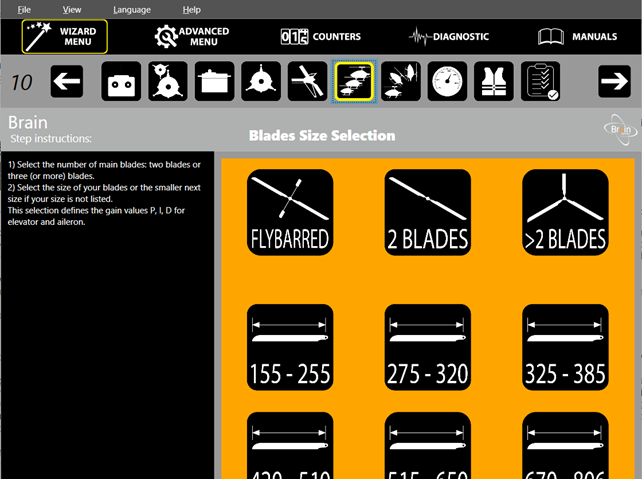
Therefore, the PID values have not been adjusted for your model and you may have severe vibration and oscillation in flight or very rubbery behavior of your model.
The Flight Log you sent us (and which you say you did on the ground on the work table, was not done with the parameters selected by default (File menu “Reset Logs to Default ...”) so we are not able to tell if the two moments when the Throttle signal briefly collapses to zero, are intentional commands (missing RxThrottle) or if there was a problem in the radio signal reception / Fail Safe (missing FrameRate). However, we see that the value of the servo and receiver supply voltage is not very “clean” and therefore we suggest that you check that you have connected with a single connector to the GOV port of the flight controller in addition to the motor rotation pulse signal also the auxiliary output of the BEC and that you have connected to the currently unused CH2 connector of the flight controller (Servo CH2 on No output) the electrolytic filter and reservoir capacitor that HobbyWing provides in its ESC packages.
Also because in this regard we see that the first thirty-two oldest events are all red “Voltage <= 4V3” events, and such a low operating voltage for such a prolonged time (344 seconds) could have been the cause of malfunctions, hot reboots of the Fligh Control Unit, etc.
Orange 102 “Power Voltage below 16.6% than startup” events are also often present, which too are an indication of possible more or less serious problems in the supply voltage of the servos, receiver and flight controller (you have to check the ServoVoltage curve to see how much the voltage actually drops).
Finally, another possible cause of problems on a model that has been stationary for many years (three), could be in the tail drive belt whose rubber may have dried and cracked and consequently cause a considerable increase in the buildup of electrostatic charges that at some point must be discharged by means of strong sparks that can disturb the operation of the receiver and flight controller.
We suggest that you spray a very light and minimal coat of lubricating and conductive spray (WD-40 which is the easiest to find may work well for this purpose) and check by means of a multimeter that the resistance between the metal parts of the tail rotor and the conductive carbon frame is zero.
In the event file you sent us above, we do not find any particular problems, and any older anomalous records are deleted to make room for more recent records. So over time the event file is constantly being “cleaned up” of new events. Given the problems reported above, however, to make you more comfortable we perform a total deletion of the old events from your Flight Control Unit so that you will see only the new events right away.
PS: Flight Control Units with built-in Bluetooth like yours use the serial signals of the SYS port to internally connect the internal Bluetooth module. Therefore, these types of FCUs do not have the SYS port available to which you can connect an external Remote USB. So in your case with your Bluetooth FCU, purchasing an external Remote USB would be an unnecessary expense. Useful instead with other FCUs without internal Bluetooth.
Hi, BrainDev; thanks for the quick response.
Once I sent the files, I also noticed that the transmitter wasn't correct. The transmitter I am using is an FrSky TARANIS X9D+ (2019). I will make the necessary changes to the configuration that you suggest. However, the primary intent of my support request was to understand how the Event Log is to be understood. All flights in the Event Log I supplied that are not part of Flight #1 are (effectively) "null and void" since they occurred three years ago. I am only concerned with how the entries for flight 1 are to be found in the log and whether the log is in a self-consistent state.
You may recall that I am a computer systems data architect, and so I am concerned with data being consistent. For example, is the exported file a dump of the internal memory of the event log or are the entries displaced in some way? Do the entries retain their location in the output between flights (i.e., does entry 67 remain entry 67 until it is overwritten, or does it move)? Are new entries inserted "top-down" (i.e. as each new event is logged, does it overwrite the next larger entry) or in some other mechanism? I'd appreciate this information so I can determine if there is an issue with the units or my understanding. If you have an example of a "normal" Event Log (preferably with a few flights in it) it would be most useful so I could "compare and contrast" with mine.
Finally, thanks for the information regarding the Remote USB interface. I was having difficulty seeing how the connectors on the BT unit would support it, so you have now clarified why it doesn't.
Event memory is a “circular” memory that contains a maximum of 200 events. New events automatically overwrite older ones.
As we have written to you, we have cleaned up your flight controller's event memory, but we see that you have not yet connected your flight controller to the configuration software to verify that the oldest events have cleared. Do you have the ability to connect to a PC via Bluetooth?
From this, I understand that the FCU keeps track of the last entry in the list and, when the power is reconnected, starts adding new events in a monotonically increasing entry number. i.e. last entry 78, new entries start at 79 and then 80 etc... Is my understanding correct?Event memory is a “circular” memory that contains a maximum of 200 events. New events automatically overwrite older ones.
I do not understand what you are saying here. In the previous post, you said:
As we have written to you, we have cleaned up your flight controller's event memory, but we see that you have not yet connected your flight controller to the configuration software to verify that the oldest events have cleared. Do you have the ability to connect to a PC via Bluetooth?
In the event file you sent us above, we do not find any particular problems, and any older anomalous records are deleted to make room for more recent records. So over time the event file is constantly being “cleaned up” of new events. Given the problems reported above, however, to make you more comfortable we perform a total deletion of the old events from your Flight Control Unit so that you will see only the new events right away.
How does one (a pilot) completely delete old events from the FCU? My inclination (as a data architect) would be to erase both the recorded flight logs and the event log from the FCU at the same time (if I decided to) - since I save them to file anyway. But in all my years of using the Brain2, I never found how to clear the Event Log. Can you please explain how, or have I misunderstood your intention in the quotation?
Also, while I said I would implement all your configuration recommendations, they don't seem to affect what might happen in the Event Log. So I intend to run another bench test and save the event log to see what is recorded. Once I have that, I'll make the changes to the configuration. If I have misunderstood the impact of your recommendations, let me know. If I have, I'll have wasted a bench test - not a big deal.
By the way, when I talk about File Comparators, I use Beyond Compare v5. I understand that the CSV file is exported with a ";" character (in the European standard), so I normally use it "as is". However, occasionally, I will convert the ";" to "," so I can more easily use other products that use the "Anglo-Saxon standard". If I were to put in a feature request to select the separator at file save time, would that be considered?
Thanks again for your help.
[Edit: I forgot to add that I normally connect to the FCU via Bluetooth from a Windows PC. I DO have the Android mobile App, but rarely use it.]
Hi Again,
I had a few minutes to spare, so I ran the second bench test I had mentioned. The flight log and the updated Event Log are attached. BC5 says that events from Flt N=1 have been deleted, and No events with Flt N=2 have been added. I must be doing something wrong! The process was: power up TX, power up heli, run test, power down heli, power down TX, power up heli, connect PC Configurator, download flight log, save, download event log, save, power up TX, set controls to lower right, save configuration.
Any indication of what is wrong?
From this, I understand that the FCU keeps track of the last entry in the list and, when the power is reconnected, starts adding new events in a monotonically increasing entry number. i.e. last entry 78, new entries start at 79 and then 80 etc... Is my understanding correct?Event memory is a “circular” memory that contains a maximum of 200 events. New events automatically overwrite older ones.
Yes
Events and other values are not editable and/or deletable by users.
As we have written to you, we have cleaned up your flight controller's event memory, but we see that you have not yet connected your flight controller to the configuration software to verify that the oldest events have cleared. Do you have the ability to connect to a PC via Bluetooth?I do not understand what you are saying here. In the previous post, you said:
In the event file you sent us above, we do not find any particular problems, and any older anomalous records are deleted to make room for more recent records. So over time the event file is constantly being “cleaned up” of new events. Given the problems reported above, however, to make you more comfortable we perform a total deletion of the old events from your Flight Control Unit so that you will see only the new events right away.
How does one (a pilot) completely delete old events from the FCU? My inclination (as a data architect) would be to erase both the recorded flight logs and the event log from the FCU at the same time (if I decided to) - since I save them to file anyway. But in all my years of using the Brain2, I never found how to clear the Event Log. Can you please explain how, or have I misunderstood your intention in the quotation?
Also, while I said I would implement all your configuration recommendations, they don't seem to affect what might happen in the Event Log. So I intend to run another bench test and save the event log to see what is recorded. Once I have that, I'll make the changes to the configuration. If I have misunderstood the impact of your recommendations, let me know. If I have, I'll have wasted a bench test - not a big deal.
By the way, when I talk about File Comparators, I use Beyond Compare v5. I understand that the CSV file is exported with a ";" character (in the European standard), so I normally use it "as is". However, occasionally, I will convert the ";" to "," so I can more easily use other products that use the "Anglo-Saxon standard". If I were to put in a feature request to select the separator at file save time, would that be considered?
Thanks again for your help.
[Edit: I forgot to add that I normally connect to the FCU via Bluetooth from a Windows PC. I DO have the Android mobile App, but rarely use it.]
Events and other values are not editable and/or deletable by users.
And so, I still don't understand what you are telling me below
As we have written to you, we have cleaned up your flight controller's event memory, but we see that you have not yet connected your flight controller to the configuration software to verify that the oldest events have cleared. Do you have the ability to connect to a PC via Bluetooth?
I do not understand what you are saying here. In the previous post, you said:
I still haven't updated the configuration yet, but my step-grandson visited and was interested in the Protos 700. He asked me to spin it up (still no blades), and I agreed. I went through: power up TX, power up heli, run test, power down heli, power down TX, power up heli, connect PC Configurator, (BT) download flight log, save, attempt to download event log, it was not visible in the Events page. I exited and restarted the configurator. This time, I saved (a truncated) Event Log. I did not save the configuration.
There are NO events in the log for Flight #3. The Log is truncated. It's beginning to look like the FCU is damaged. Can you explain what is going on?
Do you mean you did what Helifreak user bassman said in https://www.helifreak.com/8825947-post36.html?As we have written to you, we have cleaned up your flight controller's event memory, but we see that you have not yet connected your flight controller to the configuration software to verify that the oldest events have cleared. Do you have the ability to connect to a PC via Bluetooth?
I just emailed MSH and they mailed we after a while.....try it now.
I think they can reset it remotely if you connect the unit to the computer with internet.
Also if they now the serial nr of the unit.
Otherwise i don't know how they did it.
Is that why the log appears truncated?
Happy Monday morning.
Done.
Try:
Power up your unit, connect via Bluetooth to the setup software on your PC (no Android) and standing in the Wizard section, do nothing for about a minute.
Let us know if it worked.
Have a good day.
Thanks, I will do that. What am I looking for? (to know if it worked?)Happy Monday morning.
Done.
Try:
Power up your unit, connect via Bluetooth to the setup software on your PC (no Android) and standing in the Wizard section, do nothing for about a minute.
Let us know if it worked.
Have a good day.
[Edit: The Event Log appears to have been cleared correctly. Attached is the Saved Event Log after reconnecting. I believe this is what I should see following your actions. If so, then I am considering another bench run to confirm that the Event Log is behaving correctly. If so, then I propose a factory reset and then reconfiguring from scratch. Would that be a good plan?]
Good.
Yes, although it should not be necessary to do a reset and a new configuration, it would be a correct plan that would give additional assurance of a smooth operation.
Also because, already knowing how the configuration software works, having previously configured the transmitter's channels, directions, and channel excursions, and having already configured the positions of the servo horns on the servo splines and link lengths, a new configuration is a less than ten-minute operation.