

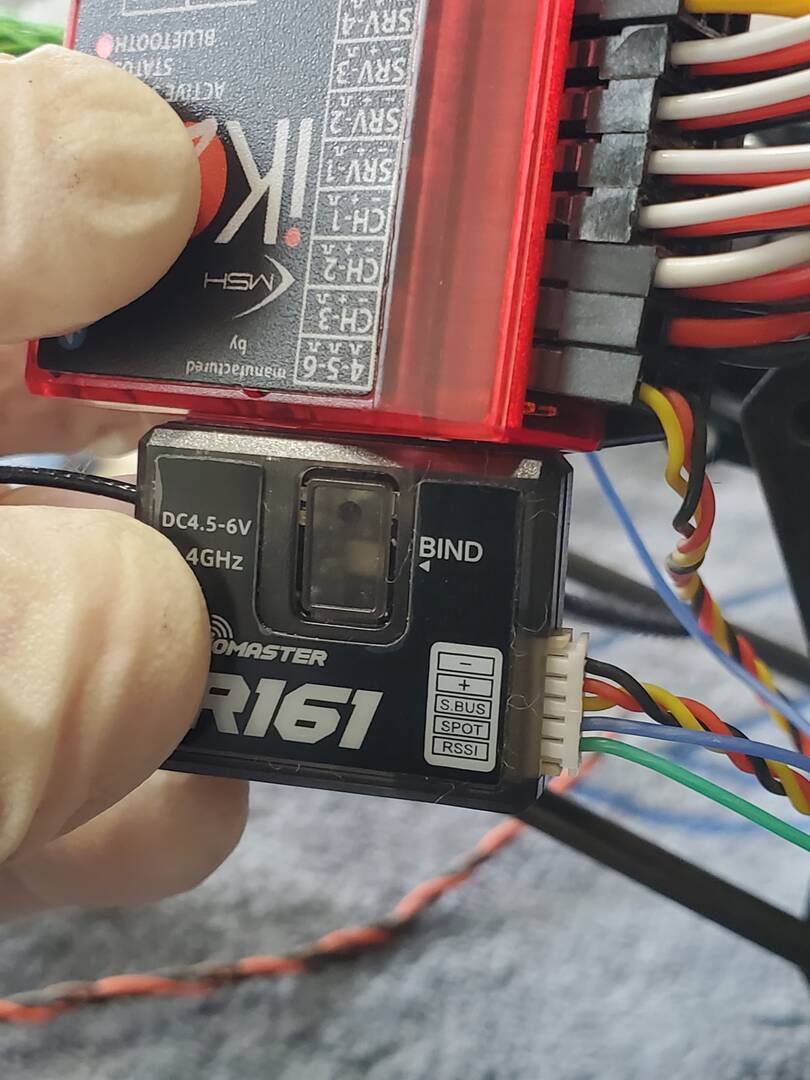
its possible to connect spot & rssi telemetry from r-161 receiver to brain2? how? plz show me how it's wiring
I have ikon2 Bluetooth, using r161 radiomaster receiver. I seen 4-5-6 on brain2 which pin it go to?

Flash your R161 with F.Port firmware, select F.Port inverted icon in the "Receiver Selection" panel 3 of the Wizand, read teh lateral instructions, then see the connections in to the successive Wizard panel 4.
With receivers that use the F.Port protocol, as explained in the instructions in panel 3 and the connection diagram in panel 4 that appears if the F.Port INVERTED icon was selected, the only connection required is to connect the S.Port output to the CH3 connector of the Brain2 control units.
AS EXPLAINED BOTH IN THE INSTRUCTIONS AND IN THE PANEL 4 SCHEME YOU MUST NEVER CONNECT VOLTAGE TO CONNECTOR CH4-5-6 BUT ONLY SIGNALS!
Inside the F.Port frames there are both channel data and telemetry data and Integrations input and output (bidirectional).
No connection is ever required between any type of receiver and the CH4-5-6 connector. It is not written anywhere!!!
As shown in the connection diagrams of panel 4, to the CH4-5-6 connector can be connected the telemetry signals coming out from the ESCs, which are decoded, read, saved in the Flight Logs and also transmitted on the F.Port bus to the receiver, which can then send them to ground to the transmitter, where various types of alarms can be triggered according to the current consumed by the battery, according to the temperature, the maximum instantaneous current etc. etc.
As explained at the bottom of the "Connections" instructions of the panel 6, for the optional telemetry connections (dashed lines) you must refer to the manual PDF "Telemetry" in the section "MANUALS".
Would it ok for one r161 satellite on bigger size helicopter such as 500 to 700?
"My r161 are connected as F.port"
We don't see any valid reason why it shouldn't work as well as all the single receivers of the other brands Spektrum, Futaba, Jeti, FrSky, JR, Graupner, Multiplex, etc. etc. work.
Usually the receivers are designed and tested to work on planes and gliders that normally fly at much greater distances than RC helicopters.
Obviously the receiver must be mounted correctly, away from sources of noise such as the motor and ESC and so that the antennas are not positioned inside the carbon frame but protrude out of it.
However, it is always a good idea to do some range testing before flying the model.
It is also important to check that the receiver is using the latest firmware version published by the receiver manufacturer in which the manufacturer has fixed any problems that may have arisen with previous firmwares and have been reported by beta testers and/or users.
The range of the radio signal depends only on the signal strength of the transmitter and the sensitivity of the receiver. Our flight control units have nothing to do with this. We therefore suggest to ask this question to the manufacturer of the transmitter and receiver.
Facebook groups and forums are a good source of informations about possible range problems.
Another important factor in the range of the radio signal is the "noise" present on the supply voltage with which the receiver is powered (see Signal to Noise ratio). Also in this case, the power supply does not depend on our flight control units but on the BEC (external or internal to the ESC) and therefore also for this it would be good to consult the BEC manufacturer. Some manufacturers (Kontronik) mount ferrites on the power supply cables to filter out the RF signals generated by the BECs, others suggest to use twisted cables for the same reason, others provide with their BECs electrolytic filters with low ESR value.
Our flight control units are able to display voltage graphs (in real time or recorded during flights) to understand if the voltage supplying the receiver and servos is sufficiently stable and "clean".
Finally, our flight control units are able to record in Flight Logs several parameters that allow you to evaluate the quality of the radio signal:
Rx Frame rate,
Rx Fades,
Rx Frame losses
Rx Holds
and, if the receiver used transmits these values to our units, also:
RSSI dbm
RSSI %


In my search to accomplish this, I found an excellent video on how to flash the R161 to use F.port protocol I hope this might help someone else https://youtu.be/jJk7NxIv81c