

On Panel 5 I had to reverse my elevator on the radio to have it work correctly.
When I get to Panel 6 I cannot get the Elevator to move forward, it goes in the opposite direction
no matter how many times I click “Servo” Reverse”
SAB Goblin 700
Cyclic Servos: Align DS610
Tail Servo: Align DS655
Flight Controller Ikon2 (latest update installed)
2 Spektrum SPM9645 Receivers
ESC: maybe PHOENIX EDGE HV 120 AMP ESC
BEC: Castle BEC Pro? 6Volt output

As explained in the instructions of Wizard panel 8, if with the correct input signal a correct swashplate movement cannot be generated by trying all eight possible combinations of the reverse of Wizard panel 8, then it means that the 1, 2 and 3 servos were not connected to the flight controller as indicated by the numbers 1, 2 and 3 in the swashplate drawings in the connection diagram of the previous Wizard panel 4, and/or that the swashplate corresponding to the model was not selected in the previous Wizard panel 6.
Under no circumstances should you fly with the input signals reversed by compensating for the error by reversing the outputs because Auto Level and/or Rescue uses the correct and intended directions for the commands and having the outputs reversed would cause the model to tip over and crash to the ground instead of straightening.
@customercare On panel 5 when I pushed the stick forward the panel went to the back (not forward) direction. I reversed the the elevator channel in the radio to have it move to the forward position on panel 5. Was this correct?
It's very simple: If you move the elevator stick forward, in panel 5 the cursor must move towards ‘Forward’:

The same applies to the other channels
@customercare You did not read and answer my question. Please read it carefully and answer the question.
I checked the servos and they are plugged into the correct Channels
Everything is already explained in the instructions on the side of panel 5.
If the signals of the various channels do not move in the directions foreseen by panel 5, you must reverse the channel on the transmitter to make the sliders move in the intended direction.
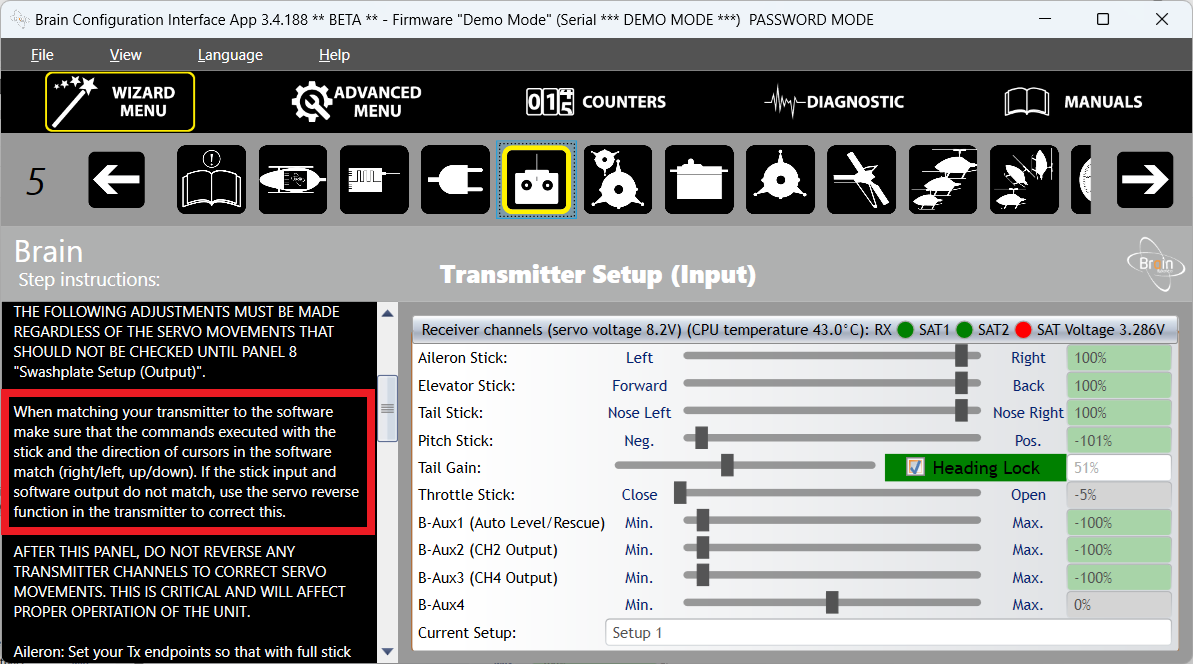
Let me restate the situation.
Step 1: Created new model (Radio: No channels reversed)
Step 2: Connect and bind to Brain
Step3: Panel 5 - IMPORTANT - the Elevator setting in Panel 5 moves BACK when the radio stick is pushed forward. The servo on the helicopter moves in the correct direction. If I reverse the elevator setting in the radio; Panel 5 moves forward when pushed forward but the servo moves backward (wrong direction).
What should I do?
As explained in this sticky post:
WHEN YOU ASK FOR SUPPORT:
Can you send your Configuration file?
Thanks
Thank you for the configuration file,
The error is having selected ‘Reversed Pitch’ used only on some models (such as HorizonHobby's Blade) which have maximum blade pitch with swashplate at the bottom over a model such as SAB's which all have maximum blade pitch with swashplate at the top.
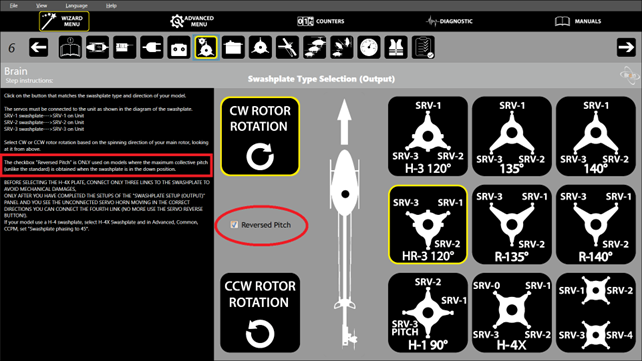
Pitch reversal must be achieved by repeatedly pressing the ‘Servo Reverse’ button on panel 8 until with pitch stick up the swashplate is in the up position (as explained in the instructions) .
This thread is a stark demonstration that if users would post right away in their first post the files indicated in the “When you ask for support” sticky, they would get the answer right away instead of after 11 posts and three days.