

I recently acquired a Crius BT adapter and connected it to my Brain 2 using an MSH cable, based on your advice here: Brain Software on Android Tablet for non-BlueTooth Brain 2 • General Discussions • MSH-Electronics Forum
Before pairing to any of my Android devices, I used my PC and USB cable to rename the Brain 2 and revise the PIN.
I then disconnected the PC and paired the Crius to my Android device, and opened the Brain Configuration App on my device. But the Crius adapter is still called CRIUS, and the PIN is the default 0000. Is it possible to rename the Crius adapter and revise the PIN using Brain software? If not, can you point me to resources that allow me to do this? I'm slightly concerned when I go to a fun fly and accidentally connect to someone else's Crius adapter or vice versa.
I have another older heli with a Brain 2 BT, where I was able to rename it and revise the PIN. I understand the internal BT device inside that unit is different than the external Crius in the other unit.

Hi,
Do you mean that after unpairing the Bluetooth module from your smartphone and/or tablet, turning off Bluetooth on your smartphone and/or tablet for a few seconds, and then turning it back on to clear the cache of Bluetooth device names, and performing a new Bluetooth device discovery, the new NAME you assigned to the Crius module isn’t displayed, and the new PIN doesn’t work for pairing—instead, you have to use the old PIN (0000)?
Please note that when you use the Windows app and select “Configure Bluetooth Module…” from the File menu, the NAME and PIN displayed are not the ones used by the device; rather, they are default names suggested by the Windows app, as explained in the text that appears in the window:
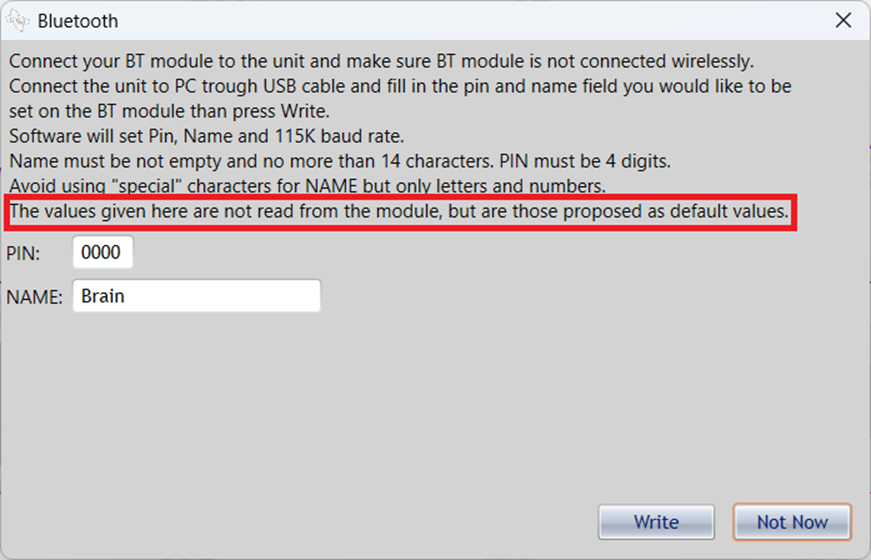
In fact, it is not possible to read the NAME and PIN from the module via the serial cable; the real NAME and PIN used by the module can only be read via Bluetooth from another Bluetooth device (smartphone/tablet/PC).
Furthermore, when changing the NAME and PIN in the Bluetooth module, after pressing the “Write” button to transmit and save the new NAME and PIN, the control unit’s LEDs stop flashing and remain lit steadily. Under no circumstances should you disconnect the power until, after several seconds (10–15 seconds), the LEDs resume flashing normally.
Furthermore, in order for the Bluetooth module to start transmitting the new NAME and using the new PIN, you must reinitialize it by powering it off and then back on.
Let us know if this information was helpful in resolving your issue.
Yes, that is what I'm saying. But I cannot say for certain that I've followed you steps precisely. I will try that, and report back.